YouTube SEO Studio

YouTube SEO Studio - Optimize Videos for Rankings | StoreDropship

Free Online YouTube SEO Studio to Optimize Your Video Rankings

YouTube SEO Studio analyzes your video title, description, tags, and keywords to provide a comprehensive optimization score. Get actionable suggestions to improve search rankings and grow your YouTube channel with data-driven metadata improvements.

Analyze and Optimize Your YouTube Video SEO

Enter your YouTube video title (recommended: 40-60 characters)
0 / 100 characters
Enter your full video description (recommended: 200-500 words)
0 / 5000 characters
Comma-separated tags (max 500 characters total)
0 / 500 characters
Your main target keyword phrase
0 / 80 characters
Select your content category
Choose your video format
0
Overall YouTube SEO Score
-

๐Ÿ“‹ Optimization Suggestions

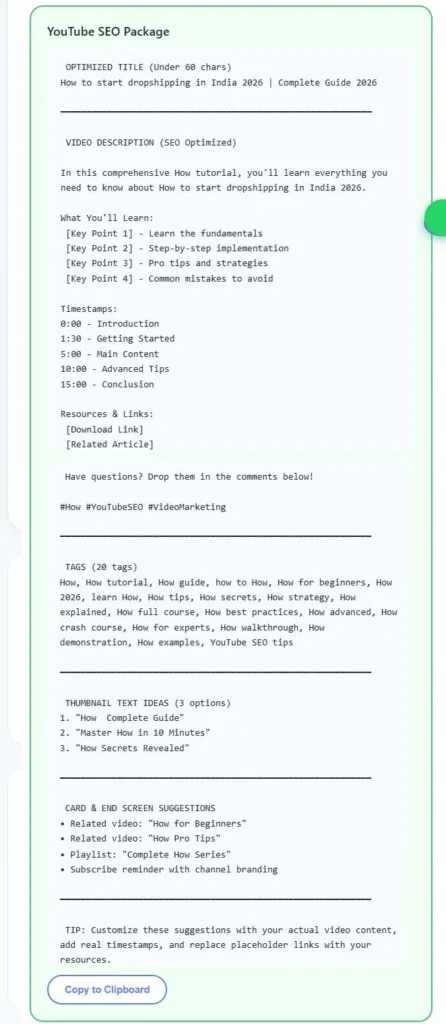
โœ… Your Optimized Title

โœ… Your Optimized Description

โœ… Your Optimized Tags

๐Ÿ”’ Your privacy is safe. All processing happens in your browser. No data is stored or sent to any server.

How to Use YouTube SEO Studio

1

Enter Your Video Title

Type or paste your YouTube video title into the title input field. The tool shows character count and SEO analysis in real time.

2

Add Your Video Description

Enter your full video description including keywords, links, and timestamps. The analyzer checks keyword usage and structure.

3

Input Your Target Tags

Add your video tags separated by commas. The tool analyzes tag count, character limits, and keyword relevance.

4

Enter Primary Keyword

Type your main target keyword or phrase that you want to rank for on YouTube search results.

5

Click Analyze SEO

Click the Analyze SEO button to get a comprehensive score breakdown with actionable improvement suggestions.

6

Copy Optimized Results

Review the detailed report and copy your optimized title, description, and tags for direct use in YouTube Studio.

Key Features of YouTube SEO Studio

๐Ÿ†“

100% Free Forever

Analyze unlimited YouTube videos without any payment, subscription, or premium upgrade requirements.

๐ŸŽฏ

Accurate SEO Scoring

Professional-grade scoring algorithm based on YouTube best practices and proven ranking optimization factors.

โšก

Instant Real-Time Analysis

Get comprehensive SEO analysis results within milliseconds with detailed breakdown of every ranking factor.

๐Ÿ”’

Complete Privacy Protection

All analysis runs locally in your browser. No video data is ever transmitted, stored, or accessed by anyone.

๐Ÿšซ

No Signup Required

Start optimizing immediately without creating accounts, verifying email addresses, or sharing personal information.

๐Ÿ“ฑ

Mobile-Friendly Design

Fully responsive interface works flawlessly on smartphones, tablets, laptops, and desktop computers of all sizes.

How the YouTube SEO Score is Calculated

SEO Score = Title Score (25%) + Description Score (25%) + Tags Score (20%) + Keyword Score (20%) + Metadata Score (10%)

Scoring Components Explained

Title Score (25 points): Evaluates character length (40-60 ideal), primary keyword presence in first half, power words usage, number inclusion, and readability for click-through optimization.
Description Score (25 points): Analyzes word count (200-500 words ideal), keyword placement in first 150 characters, presence of timestamps, call-to-action phrases, hashtags, and overall content structure quality.
Tags Score (20 points): Checks tag count (8-15 recommended), total character usage under 500 limit, primary keyword as first tag, mix of short and long-tail variations, and relevance to video topic.
Keyword Score (20 points): Measures keyword presence across title, description, and tags simultaneously. Checks for natural placement without stuffing, exact match and partial match variations, and keyword density within healthy ranges.
Metadata Score (10 points): Reviews category selection appropriateness, content type alignment, overall completeness of all fields, and cross-element consistency for maximum search visibility.

For example, if Rohan from Mumbai creates a YouTube tutorial about investing in mutual funds, an ideal title would be "How to Invest in Mutual Funds for Beginners in India 2025" (57 characters, keyword-first). The description should mention "mutual funds" within the first sentence, include timestamps, and have 300+ words of genuine content. Tags should start with "mutual funds india" followed by variations like "sip investment", "best mutual funds 2025", and "mutual fund tutorial hindi". This comprehensive approach typically scores 80+ on our SEO analysis.

YouTube SEO Optimization Examples

๐ŸŽ“ Education Channel - Priya's Tech Academy

Title: "Python Programming Tutorial for Beginners - Learn Python in 1 Hour"

Primary Keyword: "python programming tutorial"

Score: 87/100 โ€” Keyword in first position, optimal length (62 chars), includes number and benefit

Use Case: Priya from Bangalore creates coding tutorials and uses this tool to ensure each video ranks for competitive programming keywords in Indian search results.

๐Ÿณ Cooking Channel - Amit's Kitchen Diaries

Title: "Dal Makhani Recipe - Restaurant Style Easy Dal Makhani at Home"

Primary Keyword: "dal makhani recipe"

Score: 82/100 โ€” Great keyword placement, descriptive title with modifiers, moderate length ideal for mobile

Use Case: Amit from Delhi optimizes his Indian recipe videos to rank above competitors by ensuring comprehensive metadata coverage.

๐Ÿ’ผ Business Channel - Neha's E-Commerce Tips

Title: "How to Start Dropshipping Business in India 2025 - โ‚น0 Investment"

Primary Keyword: "dropshipping business india"

Score: 91/100 โ€” Perfect keyword placement, year freshness signal, emotional hook with โ‚น0 investment claim

Use Case: Neha from Pune creates business tutorials and uses the SEO studio to maximize organic reach for her entrepreneurship content.

๐ŸŽฎ Gaming Channel - Raj's Game Zone

Title: "BGMI Best Sensitivity Settings 2025 - No Recoil Pro Tips"

Primary Keyword: "bgmi sensitivity settings"

Score: 78/100 โ€” Good keyword match, trending topic, but description could include more detailed gameplay tips and timestamps

Use Case: Raj from Hyderabad optimizes his gaming content to capture search traffic from millions of Indian mobile gamers searching for tips.

What is YouTube SEO Studio

YouTube SEO Studio is a comprehensive, free online tool designed to help YouTube creators optimize their video metadata for better search rankings and discoverability. Whether you are a beginner uploading your first video or an established creator with thousands of subscribers, proper SEO optimization is essential for growing your YouTube channel organically through search traffic and suggested video recommendations.

This tool analyzes four critical elements of YouTube SEO: your video title, description, tags, and keyword targeting strategy. It evaluates each component against proven best practices used by successful YouTube channels and provides a detailed score along with specific, actionable suggestions for improvement. The analysis covers character length optimization, keyword placement patterns, content structure quality, and cross-element consistency to ensure your metadata works together as a cohesive optimization strategy.

Built by the StoreDropship team with insights from experienced YouTube creators and digital marketing professionals, this studio reflects real-world optimization techniques that have been shown to improve video visibility in YouTube search results. It is particularly useful for Indian creators producing content in English, Hindi, or regional languages who want to compete effectively in YouTube's increasingly competitive algorithm. Every analysis runs entirely in your browser, ensuring complete privacy and security for your upcoming video strategies and content plans.

Frequently Asked Questions

Yes, this YouTube SEO Studio is completely free to use with absolutely no hidden charges, premium tiers, or signup requirements. You can analyze unlimited videos, generate optimized titles, descriptions, and tags without paying anything. StoreDropship believes in providing professional-quality SEO tools accessible to every creator, whether you are a beginner starting your first channel or an experienced YouTuber managing multiple channels across different niches.
Absolutely. Your video titles, descriptions, tags, and keywords are processed entirely within your web browser using client-side JavaScript. No data is ever transmitted to any server, stored in any database, or shared with any third party. Once you close or refresh the browser tab, all entered information disappears completely. This privacy-first approach ensures your content strategies and upcoming video ideas remain confidential and secure at all times.
This YouTube SEO Studio uses industry-standard SEO best practices recommended by YouTube creator guidelines and experienced video marketing professionals. The scoring algorithm evaluates title length, keyword placement, description structure, tag optimization, and metadata completeness. While no tool can guarantee specific rankings since YouTube uses complex algorithms, following the recommendations provided by this studio significantly improves your chances of appearing in search results and suggested videos.
A score of 80 or above is considered excellent and indicates your video metadata is well-optimized for YouTube search. Scores between 60-79 are good but have room for improvement. Scores between 40-59 indicate moderate optimization with several areas needing attention. Below 40 means significant optimization is needed. Focus on achieving at least 70+ for competitive keywords by following all the suggestions provided in the detailed analysis report.
The ideal YouTube title length is between 40-60 characters. YouTube displays approximately 60-70 characters on desktop and fewer on mobile devices. Titles shorter than 30 characters may not contain enough keywords for search optimization. Titles longer than 70 characters get truncated in search results, hiding important information. Always place your primary keyword within the first 40 characters to ensure visibility across all devices and search result formats.
YouTube allows up to 500 characters total for tags. The recommended approach is using 8-15 relevant tags that include your primary keyword, keyword variations, and related topic tags. Start with your exact target keyword as the first tag, then add 2-3 word phrase variations, and finally broader category tags. Avoid using irrelevant or misleading tags as YouTube may penalize your video for tag spam, reducing its visibility in search results.
Yes, the video description plays a significant role in YouTube SEO. YouTube reads the first 150-200 characters to understand your video content and display in search results. Include your primary keyword in the first two sentences, add relevant secondary keywords naturally throughout, and aim for 200-500 words total description length. Adding timestamps, links, and structured sections also helps YouTube understand your content better and can improve click-through rates.
The best YouTube keywords are those with high search volume but moderate competition. Long-tail keywords with 3-5 words typically perform better for newer channels. Use YouTube search suggestions by typing your topic and noting auto-complete phrases. Keywords starting with how to, best, review, tutorial, and comparison tend to have strong search intent. This tool helps you analyze whether your chosen keywords are properly placed in your title, description, and tags for maximum impact.
Yes, this YouTube SEO Studio works perfectly for YouTube Shorts optimization as well. While Shorts have slightly different discovery mechanisms with more emphasis on the Shorts feed, proper SEO still matters for search discoverability. For Shorts, keep titles under 40 characters, use trending hashtags in the description, and focus on 3-5 highly relevant tags. The tool will analyze your Shorts metadata and provide specific optimization tips for short-form content.
You should review and update your video SEO every 3-6 months, especially for evergreen content that continues to receive views over time. YouTube allows you to update titles, descriptions, and tags anytime without penalties. If a video is underperforming, try updating the title with trending keywords, refreshing the description with current information, and adding new relevant tags. Re-optimizing older videos is one of the most effective strategies for growing YouTube channel views organically.
Yes, this YouTube SEO Studio is designed to work for every YouTube niche and content category including technology, education, entertainment, cooking, fitness, gaming, finance, travel, beauty, and more. The SEO principles of keyword optimization, proper metadata structure, and content relevance apply universally across all niches. Whether you create tutorials in Hindi, vlogs in English, or product reviews in any language, the optimization analysis provides relevant and actionable recommendations for your specific content.
Tags are hidden metadata that help YouTube understand your video content and are added in the tags section of YouTube Studio. Hashtags are visible text added in the title or description preceded by the hash symbol and appear as clickable links above the video title. Both serve SEO purposes but work differently. Tags help with search algorithm understanding while hashtags create browsable topic pages. Use 3-5 hashtags in your description and 8-15 tags in the dedicated tags field for optimal results.
YouTube ranking depends on multiple factors beyond metadata optimization. Watch time, click-through rate, audience retention, engagement metrics like likes and comments, upload consistency, and channel authority all influence rankings significantly. Good SEO ensures YouTube can discover and categorize your content correctly, but viewer engagement determines final positioning. Focus on creating compelling thumbnails for higher CTR, delivering value in the first 30 seconds for retention, and encouraging comments for engagement signals alongside proper SEO optimization.

Share This Tool

Found this tool useful? Share it with friends and colleagues.

Scroll to Top
๐Ÿ’ฌ